
Why Everyone Is Suddenly Obsessed With Gemini Photo Prompts
Something quietly shifted this year. Photo editing stopped being about sliders, layers, and thirty-minute Photoshop sessions — and started being about sentences. You type what you want, Gemini reads it, and thirty seconds later a polished image appears. That is the whole workflow.
Google’s Gemini image model — nicknamed Nano Banana — is the reason. It rocketed to more than 23 million new users in a matter of days after launch, and generated more than 500 million images in its first weeks, according to Google VP Josh Woodward’s public update on the traffic spike (NDTV Profit). Later in the year, Google shipped Nano Banana Pro (Gemini 3 Pro Image) with native 4K output, legible text, and up to 14 reference images per prompt (Google Cloud Blog).
Here is the catch though. The tool is only as good as your prompt. Type “make me look nice” and you get generic AI mush. Feed it a properly built sentence with subject, style, lighting, and lens — and it hands you an editorial-grade portrait. This guide gives you the exact copy-paste prompts, the reasoning behind why they work, and the small tweaks that turn a decent output into a scroll-stopping one.
You will get:
- 25+ ready-to-paste Gemini AI photo prompts across headshots, cinematic looks, product shots, restoration, and viral trends.
- Google’s official prompt formula for Nano Banana and Nano Banana Pro.
- Fix-it prompts for when Gemini changes your face or blurs your outfit.
- A short FAQ answering the questions people keep DM-ing about.
What Is a Gemini AI Photo Prompt (And Why Nano Banana Changed the Game)
A Gemini AI photo prompt is a written instruction you give Google’s Gemini app so it can either generate a new image from scratch or edit a photo you upload. The current image engine behind it — Nano Banana (Gemini 2.5 Flash Image) and its bigger sibling Nano Banana Pro (Gemini 3 Pro Image) — is what actually renders your request.
A few facts worth knowing before you paste anything:
- Native resolutions: Nano Banana Pro renders at 1K, 2K, and true 4K. Nano Banana 2 (Flash Image) also supports 512px for fast previews.
- Aspect ratios: Both models handle 1:1, 3:2, 2:3, 4:5, 9:16, 16:9, and 21:9. The Flash model adds ultra-wide 4:1 and 8:1 for banners.
- Reference images: You can mix up to 14 reference images in a single prompt, which is why “keep the person in Photo 1 wearing the outfit in Photo 2” now works cleanly.
- Knowledge cutoff: January 2025, so avoid asking for events after that date.
The reason Nano Banana feels different from earlier image AIs is identity preservation. Older models would “beautify” your face into a stranger. Nano Banana, when prompted correctly, keeps your bone structure, skin texture, and expression intact while changing everything around you — outfit, background, lighting, era.
Google’s Official Prompt Formula for Gemini Image Generation
Before we dive into copy-paste prompts, memorise this one formula. It is straight from Google’s own prompting guide (Google Cloud Blog) and it fixes 80% of bad outputs on day one.
The core formula:
[Subject] + [Action] + [Location/Context] + [Composition] + [Style]
For photo editing tasks that include a reference image, use:
[Reference image] + [Relationship instruction] + [New scenario]
Google’s four non-negotiable rules for great results:
- Be specific. Name the subject, the lighting, and the composition. “A woman” is weak. “A woman in her early 30s, wearing an ivory linen suit, softly backlit by golden-hour sun” is strong.
- Use positive framing. Say “empty street” instead of “no cars”. The model responds better to what you want than what you don’t.
- Control the camera. Use real photography terms — 85mm lens, f/1.8, low angle, shallow depth of field, three-point studio lighting.
- Iterate conversationally. Do not scrap and restart. Reply with “same image, but move the light to the left” or “keep the face, change the outfit to a black turtleneck.”
If you want a deeper dive into structured prompt writing beyond photo work, this walk-through on the CRISPE framework shows how the same subject-style-context thinking applies to any AI tool.
25+ Best Gemini AI Photo Prompts You Can Copy and Paste Right Now
Every prompt below has been shortlisted from tested community outputs, official Google guidance, and the top-ranking prompt collections of 2026. Copy the text between the quotation marks, upload your photo in the Gemini app or Google AI Studio, and paste it in.
Section 1 — Professional Headshot & LinkedIn Prompts
1. The Executive Studio Headshot (navy suit, dark background)
“Generate a professional, high-resolution profile photo of the person in the input image, maintaining the exact facial structure, identity, and key features. Frame from the chest up with ample headroom. The subject faces the camera at a slight 3/4 angle with a confident, authoritative expression. Wardrobe: premium navy business suit, crisp white shirt, understated tie. Background: solid #141414 neutral studio. Lighting: bright, diffused softbox with a subtle catchlight in the eyes. Shot on an 85mm f/1.8 lens with shallow depth of field, soft bokeh, crisp fabric detail, natural skin texture. Clean cinematic color grading, subtle warmth, executive-presence atmosphere.”
Why it works: It locks the face, dictates the wardrobe, sets a real lens, and gives a hex code for the background so the AI does not guess.
2. The Approachable Founder Headshot (henley, casual pro)
“Professional profile photo of the person in the input image, keeping the exact face and features. Chest-up framing, casual lean, relaxed and approachable expression. Wardrobe: heather-gray henley with rolled sleeves. Background: solid #141414 studio. Bright, airy diffused lighting with a soft catchlight. Shot on 85mm f/1.8, shallow depth of field, sharp focus on the eyes. Preserve realistic skin texture and individual hair strands. Modern, innovative, and approachable atmosphere.”
3. The Black-and-White Editorial Portrait
“Create a high-end black-and-white portrait from my uploaded selfie. Keep every facial detail exactly as in the original — no retouching, no smoothing, no digital makeup. Wardrobe: business suit. Lighting: dramatic studio-quality with strong contrast and sculpting shadows. Background: blurred soft studio gradient. Frame: vertical 9:16, centered composition, ultra-realistic skin texture. Final look should feel timeless, editorial, and emotionally powerful — gallery-worthy.”
4. Corporate CEO — Warm Boardroom
“Modern corporate CEO headshot of the person in the reference image. Preserve exact facial identity. Wardrobe: charcoal single-breasted suit, open collar shirt. Background: softly blurred modern office with warm daylight through floor-to-ceiling windows. Lighting: window key light with a subtle fill from camera-left. 50mm lens, f/2.0. Confident half-smile, direct eye contact. Editorial magazine feel, natural skin, 4K.”
Bonus tip for identity-safe headshots: Upload 2–3 clear close-ups instead of one. Nano Banana averages the identity signal across all inputs, which massively cuts down on face drift.
Section 2 — Cinematic & Editorial Portrait Prompts
5. Rainy Night Noir Portrait
“Ultra-cinematic portrait of the person in the reference photo, standing in the rain at night. Intense expression, wet hair sticking to the forehead, piercing eyes staring straight ahead. Dramatic low-key lighting highlighting raindrops on face and jacket. Dark, moody atmosphere with subtle backlight catching the falling rain. High-contrast, hyper-realistic texture, deep shadows, 85mm lens, shallow depth of field, filmic color grading, stormy noir aesthetic.”
6. The Metro Station Slow-Motion Shot
“Profile shot of the person in the uploaded image walking through a rushing metro station crowd. Everyone else is motion-blurred with trailing effects, while the subject remains in sharp focus with a serious expression, wearing a long trench coat. Cool blue tones dominate the scene, evoking a 35mm film aesthetic. Ambient lighting from train signs and station fixtures. Portrait 4:3 ratio.”
7. Wong Kar-wai-Style Neon Melancholy
“Melancholic cinematic close-up of the person in the reference photo, seated alone in a small Hong Kong noodle shop at night. Neon signage reflects on the rain-streaked window beside them. Wardrobe: fitted 1990s cheongsam-inspired top / dark blazer. Lighting: teal and magenta neon, single warm tungsten bulb overhead. Shot on 35mm f/1.4 with heavy grain, shallow focus, quiet emotional atmosphere. Aspect ratio 2.35:1.”
8. Golden-Hour 1970s Editorial
“Nostalgic 1970s fashion editorial of the person in the reference image, wearing flared jeans and a vintage suede jacket, standing in an open golden wheat field at sunset. Warm amber color grading, subtle lens flare, analog Kodak Portra film stock texture, low-contrast shadows, dreamlike aesthetic. Preserve exact facial features. 3:2 aspect ratio.”
9. Double Exposure Portrait (city + face)
“Cinematic double-exposure portrait of the person in the reference image, blended with a moody night skyline of a city. The subject’s silhouette contains the illuminated buildings and streaks of car light trails. Monochrome base with a warm amber tint in the skyline. Fine art photography style, high resolution, editorial mood.”
10. Rugged Man in the Frost
“Ultra-cinematic portrait of a powerful man wearing a frost-covered fur-lined jacket, standing in an Arctic tundra at blue hour. Snowflakes drifting through the air, breath visible. Sharp jawline, weathered skin, piercing eyes, dramatic side lighting. 85mm lens, shallow depth of field, hyper-realistic texture, filmic color grade. Preserve the face from the uploaded reference.”
Section 3 — Trending Viral Gemini Prompts (2026)
These are the prompts blowing up on Instagram and X right now, based on trend reporting from India Today, NDTV, and Hindustan Times (NDTV Profit).
11. Hug Your Younger Self (upload 2 photos)
“Create a cute, warm polaroid-style photograph of my older self hugging my younger self. Both people should retain their exact facial features from the uploaded images. Natural indoor lighting, soft film grain, slight motion blur to feel candid, gentle color palette. Add a small white polaroid border and a light shadow behind it, as if placed on a wooden desk.”
12. 3D Collectible Figurine on a Desk
“Create a highly detailed 1/7 scale commercialized figurine of the person in the uploaded image, in a realistic style, in a real environment. The figurine is displayed on a transparent acrylic base on a modern wooden computer desk. On the screen behind it, show the ZBrush interface with wireframes and textures of the same figurine. Next to the figurine, place a BANDAI-style toy box featuring the character artwork. Soft natural window light, gentle shadows, photorealistic materials.”
13. Vintage Bollywood Saree Portrait
“Transform the person in the uploaded image into a vintage 1970s Bollywood heroine wearing a flowing red chiffon saree with gold border. Style the hair in soft romantic waves with a single flower tucked in. Background: warm golden-hour sunset over a heritage haveli, minimalist and slightly hazy. Add subtle film grain, soft-focus, dreamy color grade. Preserve exact facial features and skin tone.”
14. Polaroid Selfie With a Celebrity
“Create a 4K realistic polaroid-style photo of the two people from the uploaded images posing together naturally in a candid moment. Keep both faces unchanged. Warm consistent lighting, soft slight blur for a film-like effect, white curtain backdrop, subtle 1990s film grain. Add a thick white polaroid border and a small shadow underneath the print.”
15. Pre-Wedding Rajasthani Fort Shoot
“Design a pre-wedding photoshoot of the couple in the uploaded images at a grand Rajasthani sandstone fort. The bride wears a deep red lehenga with intricate gold embroidery; the groom wears a cream sherwani. They pose on carved stone steps beneath sandstone arches. Warm sunset light bathes the scene; marigold petals scattered across the courtyard. Preserve exact facial features of both people. Cinematic 3:2 ratio.”
16. Retro 80s Album Cover
“Recreate the person in the uploaded image as the cover subject of an 80s synthwave album. Neon-magenta and cyan gradient background, gridded horizon in the distance, chrome-effect band title floating above their head. Wardrobe: oversized blazer with rolled sleeves and pastel tee. Slight film grain, VHS scanlines, dreamy soft-focus. Preserve exact facial features.”
Halfway through, a small mental checkpoint. If a prompt is not delivering after two attempts, do not keep firing the same request — Gemini learns inside the same chat window. Reply with a fix, not a repeat. That single habit changes everything, and the same principle carries over into anything you build with generative AI, which is why understanding prompt engineering as a discipline still matters even when the tools get easier every month.
Section 4 — Product, E-commerce & Commercial Prompts
17. Premium Studio Product Shot
“Premium studio product photograph of [YOUR PRODUCT — e.g. matte black reusable water bottle] on a light gray stone surface. Use softbox lighting from the top-left, realistic contact shadows, subtle reflections on the surface, crisp product edges, and a calm wellness-brand mood. Keep the product shape, cap, material, logo, and colors 100% accurate to the reference photo. No extra props, no random text, no distorted packaging. Square 1:1 crop.”
18. E-commerce Texture Enhancement (edit existing)
“Polish this product shot for a high-end catalog. Sharpen the micro-textures of the material — leather, metal, or fabric — so the surface looks tactile. Neutralize any yellow color cast from indoor lighting. Add a soft, natural reflection beneath the product to give it a sense of weight. Keep the product’s shape, color, and label completely unchanged.”
19. Lifestyle Product Placement
“Lifestyle shot of [YOUR PRODUCT] on a linen throw beside a steaming ceramic mug of coffee, on a sunlit bedroom floor at 8 a.m. Warm morning light, soft shadows, natural bokeh in the background. 35mm lens, f/2.8. Keep the product accurate to the reference. Add subtle grain for an editorial feel.”
20. Skincare & Botanical Staging
“Editorial skincare product staging of [YOUR BOTTLE] on a smooth marble slab, surrounded by fresh eucalyptus leaves, a single water droplet on the bottle’s shoulder, and a soft shadow from an overhead skylight. Clean minimalist composition, cool color palette, macro-lens sharpness on the label. Do not distort the label text or shape.”
Section 5 — Restoration, Retouching & Everyday Edits
21. Restore a Faded Vintage Photo
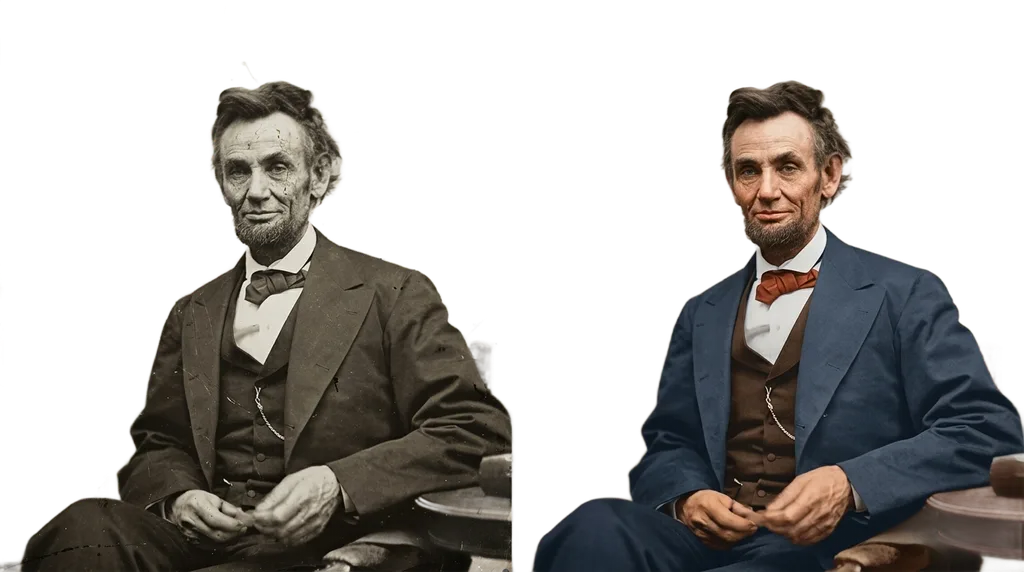
“Restore this faded vintage photograph. Remove scratches, dust, and creases. Recover lost detail in the shadows and highlights. Preserve the original composition, faces, and clothing exactly. Gently colorize with historically accurate, muted tones. Keep a subtle film grain so it still feels authentic — do not make it look modern or over-sharpened.”
22. Portrait Retouching (natural, not filtered)
“Edit this portrait by gently removing temporary skin blemishes, softening dark circles, and slightly brightening the eyes. Improve natural skin texture and add a soft healthy glow. Balance exposure and add mild sharpness. Keep facial features, skin tone, hairstyle, freckles, and expression completely unchanged. Do not smooth pores. Realistic high-resolution portrait.”
23. Background Cleanup
“Remove all distracting objects and people from the background of this photo while keeping the subject exactly as they are. Rebuild the background naturally with matching lighting, perspective, and color temperature. Do not change the subject’s position, pose, or expression.”
24. Change Outfit Without Changing the Face
“Using the person from the uploaded photo, change only their outfit to a fitted black turtleneck and camel wool overcoat. Keep the exact face, hairstyle, pose, background, and lighting unchanged. Match the new outfit’s shadows and highlights to the existing scene lighting so the swap looks natural.”
25. Realistic Hair Color Change
“Change the hair color of the person in the uploaded photo to a natural warm chestnut brown with subtle honey highlights. Preserve the exact hairstyle, individual strands, roots, and how light hits the hair. Do not change facial features, skin tone, background, or lighting. Result must look like a real salon color, not a filter.”
26. Photo to Miniature World (tilt-shift)
“Apply a realistic tilt-shift effect to this cityscape to make it look like a miniature model. Create a sharp focus band through the center of the image with a pronounced blur gradient above and below. Slightly boost saturation and contrast to mimic the vivid colors of a painted diorama. Keep the scene’s geometry accurate.”
27. Time-Travel Film Look
“Make this photo look like it was just developed from a film camera found in a 1970s attic. Add subtle film grain, slight color fading at the edges, a tiny light leak in one corner, and slightly milky blacks. Keep the subject clear and recognizable. It should feel like a found memory, not a filter.”
Advanced Prompting Tips That Separate Good From Great
Prompts alone will only get you so far. The people posting scroll-stopping Gemini edits also do these small things:
- Upload high-quality references. A single sharp close-up beats five blurry selfies. Nano Banana grabs identity signal from pixel detail.
- Lock the face explicitly. Adding “preserve exact facial structure, identity, and key features” cuts face drift dramatically.
- Give a hex code for backgrounds. “#141414 neutral studio” is more reliable than “dark background.”
- Name real camera gear. “85mm f/1.8” or “Kodak Portra 400 film stock” pulls the model toward realistic image libraries.
- Set the aspect ratio inside the prompt. Even if the app has a UI toggle, writing “9:16 vertical” or “3:2 landscape” reinforces it.
- Iterate with delta requests. “Same image, but move the key light to camera-left and lengthen the coat” is much better than starting over.
- Batch your generations. Ask for “three variations of the same prompt with slight lighting differences” to compare in one go.
For anyone new to writing structured AI instructions, a good starting point is this list of ChatGPT image prompts — the syntax translates cleanly to Gemini because both models respond to the same subject-composition-style skeleton.
Nano Banana vs Nano Banana Pro: Which One Should You Use?
Google runs two image models inside Gemini right now, and the differences matter more than most guides admit.
| Feature | Nano Banana 2 (Flash Image) | Nano Banana Pro (Gemini 3 Pro Image) |
|---|---|---|
| Speed | Very fast, near-real-time | Slower, higher-quality passes |
| Max resolution | 4K + 512px preview | True 4K |
| Aspect ratios | 1:1 to 8:1 ultra-wide | 1:1 to 21:9 |
| Reference images | Up to 14 | Up to 14 |
| Text rendering | Good | Excellent (legible signs, posters) |
| Best for | Selfies, social posts, quick iterations | Ad creatives, posters, product shots with text |
Data compiled from Google’s official Nano Banana specs (Google Cloud Blog).
Rule of thumb: iterate with Flash, finalize with Pro. If your final image needs readable text — a movie poster, a product label, a social post with a slogan — always finish on Pro.
Common Mistakes People Make With Gemini Photo Prompts (And How to Fix Them)
- Writing walls of text. Long prompts drift. Aim for one purpose per prompt.
- Using negative language. “No blur, no filter, no distortion” often makes those things worse. Say what you do want.
- Forgetting identity anchors. Without “preserve exact facial features”, Nano Banana will nudge your face toward an average.
- Mixing conflicting styles. “Cyberpunk 1970s film noir vaporwave” is a mess. Pick one dominant style.
- Ignoring aspect ratio. A 16:9 prompt for an Instagram Story gets cropped badly. Match the ratio to the platform.
- Trying to fix everything at once. Edit one thing per turn. Change the background, then in the next turn change the outfit.
If Gemini keeps changing your face, the fix is usually one of three things: upload a sharper close-up, restate the identity-preservation line at the end of the prompt (models weigh recency), or reduce the number of stylistic modifiers so the identity signal is not overwhelmed.
Where Gemini Photo Prompts Are Heading Next
The trend for late 2026 is clear: less filter, more story. Users are moving away from the smoothed, glowy “AI face” look and toward prompts that feel like real photography — grain, imperfect lighting, honest skin. Google’s own guide leans into this, calling for cinematic terminology instead of stylistic buzzwords.
Two directions worth watching:
- Multi-image scene assembly. Being able to combine up to 14 references means storytelling collages — “put me and my dog on this beach with my grandma’s saree draped over the chair” — are now one prompt away.
- Text-in-image reliability. Nano Banana Pro’s legible text output is quietly killing entire categories of graphic design work, from posters to menus to social ads.
The prompt writers who win in 2026 are the ones treating this like a craft, not a hack. Better inputs, tighter language, and a genuine understanding of what the model reads for. That is the whole game.
Frequently Asked Questions
What is the best Gemini AI photo prompt for a professional LinkedIn headshot?
The Executive Studio Headshot prompt (Prompt #1 above) is the highest-hit-rate template for LinkedIn. It locks the face, dictates the background hex code, sets a real 85mm lens, and produces a chest-up 3/4-angle portrait that fits LinkedIn’s frame perfectly. For a warmer, founder-style look, use Prompt #2 (the henley variant).
How do I stop Gemini from changing my face?
Do three things. First, upload a sharp, well-lit close-up — not a group shot. Second, add “preserve exact facial structure, identity, and key features” at both the start and the end of your prompt. Third, avoid stacking too many stylistic modifiers; strong style prompts can overwhelm the identity signal.
Is Gemini photo editing free?
Yes, the Gemini app and Google AI Studio both let you edit and generate images with Nano Banana at no cost, with daily usage limits. Nano Banana Pro (Gemini 3 Pro Image) is available inside Gemini Advanced and via Vertex AI for pro users.
What resolution can Gemini generate images in?
Nano Banana 2 (Flash Image) supports 512px, 1K, 2K, and 4K. Nano Banana Pro supports 1K, 2K, and true 4K natively. Aspect ratios range from square to ultra-wide 21:9, and Flash also offers vertical 1:4 and 1:8 for banner formats.
Can I use these Gemini prompts on ChatGPT or Midjourney?
Mostly yes, with light editing. The subject-style-composition-lens structure works across all three. However, Midjourney does not accept as many reference images, and ChatGPT’s image tool weights descriptive adjectives differently. Test the same prompt on both and compare — the differences will teach you a lot.
Why does Gemini sometimes add extra fingers or distort text?
That is a known artifact of diffusion-based image models. For fingers, add “anatomically accurate hands, five fingers” to your prompt. For text, switch to Nano Banana Pro — it renders text far more reliably than Flash.
How many reference images can I upload in one Gemini prompt?
Up to 14 reference images per prompt on both Nano Banana models. This is what makes multi-person, outfit-swap, and background-transfer prompts finally work well.
Are there any privacy risks with Gemini photo prompts?
Yes, worth being honest about it. Cybersecurity experts have publicly warned that uploading facial photos to any generative AI tool can create facial-data exposure risk. Do not upload photos of minors, government IDs, or images you would not post publicly. Read Google’s data-use policy before uploading anything sensitive.
Final Word
The best Gemini AI photo prompts in 2026 are not the flashiest. They are the ones that read like a photographer briefing a stylist and a lighting tech in the same sentence — clear subject, real camera language, one dominant mood, identity locked. Copy any prompt above, swap the bracketed bits for your details, and you are already ahead of 90% of the people posting AI portraits online.
Save this page. Come back to it. The prompts get better every time you tweak them for your own face, your own product, or your own story.