
TL;DR — Quick Answer: The best ChatGPT image prompts follow a simple five-part formula (subject, action, setting, style, constraints). Add camera language like “85mm f/1.4,” lock the face with “preserve facial identity exactly,” and iterate one change at a time. Copy the 60+ prompts below to create portraits, headshots, action figures, product shots, Ghibli edits and viral AI photos in minutes.
ChatGPT no longer just writes — it shoots, retouches, and reimagines your photos in seconds. And honestly? Most people are still writing prompts that waste that superpower.
The gap between a boring AI blob and a magazine-cover portrait comes down to one thing: how you prompt. This guide hands you 60+ tested, copy-paste ChatGPT image prompts, a five-part formula the pros use, viral trend templates, and the tiny tweaks that keep your face looking like you — not a stranger the model invented.
Whether you want a LinkedIn headshot, a Funko Pop version of yourself, a restored family photo, or a scroll-stopping product shot, you’ll find the exact prompt below. Let’s get to it.
What’s New in ChatGPT Image Generation in 2026
OpenAI released ChatGPT Images 2.5 on September 8, 2026, bringing sharper details, up to 50% faster generation, and more reliable face preservation across multi-turn edits.
Here’s what actually changed and why it matters for your prompts:
- Two new API models — GPT-Image-2.5 Flare (built for speed and volume) and GPT-Image-2.5 Sunburst (built for premium precision).
- Up to 50% lower generation latency vs. Images 2.0 — so you can iterate faster without waiting a minute per image.
- Reference-photo fidelity — subjects survive style changes, wardrobe swaps and new backgrounds without morphing into a stranger.
- Multi-turn editing memory — earlier changes persist across follow-up edits inside the same chat.
- Focused edits — the model changes only what you ask for and leaves the rest untouched.
- New Sketch tool — type
@Sketch, draw your rough idea, add a text description, and ChatGPT builds the finished image around your doodle. - Templates and shareable prompts — one-click starting points for posters, merch, and product photos.
You can read the full changelog on OpenAI’s official Images 2.5 announcement, but the practical takeaway is simple: detailed prompts win harder than ever, because the model actually listens now.
Key takeaway: If your prompts still say “make a cool image of a cat,” you’re leaving 80% of the model’s ability on the table.
The 5-Part Formula for a Perfect ChatGPT Image Prompt
Every strong ChatGPT image prompt names the subject, the action, the setting, the style, and the constraints — usually in one to three tight sentences before you start refining.
Think of prompting like briefing a professional photographer, not typing into a search bar. Every blank you leave, the model fills in — usually badly.
Use this five-part scaffold every time:
- Subject — Who or what is in the frame, described specifically. “A 32-year-old woman with shoulder-length auburn hair” beats “a woman.”
- Action or pose — What the subject is doing. Leaning against a doorway, mid-laugh, arms crossed, gazing off-camera.
- Setting — The environment, time of day, and depth of the background.
- Style and camera language — Art style, lens (35mm, 85mm f/1.4), lighting (softbox, golden hour, harsh flash), and finish (film grain, matte, glossy).
- Constraints — Aspect ratio, what must stay unchanged (face, outfit), and what to avoid (no watermark, no extra people).
OpenAI’s own image generation documentation recommends keeping a first-pass prompt under three clear sentences, then iterating with focused follow-ups. That matches what actually works in the wild.
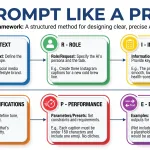
If you like structured prompt frameworks, the CRISPE framework works beautifully as a scaffold for image prompts too — swap “role” for “art style” and “constraints” stays the same.
Pro tip: Save your best-performing prompt as a template. Then just swap the placeholders each time you use it.
Best ChatGPT Image Prompts for Photorealistic Portraits
For photorealistic ChatGPT portraits, name real camera gear (85mm f/1.4, Canon R5), specific lighting (softbox at 45°, golden hour), and skin details (visible pores, subtle catchlights).
1. Hyper-Realistic DSLR Portrait
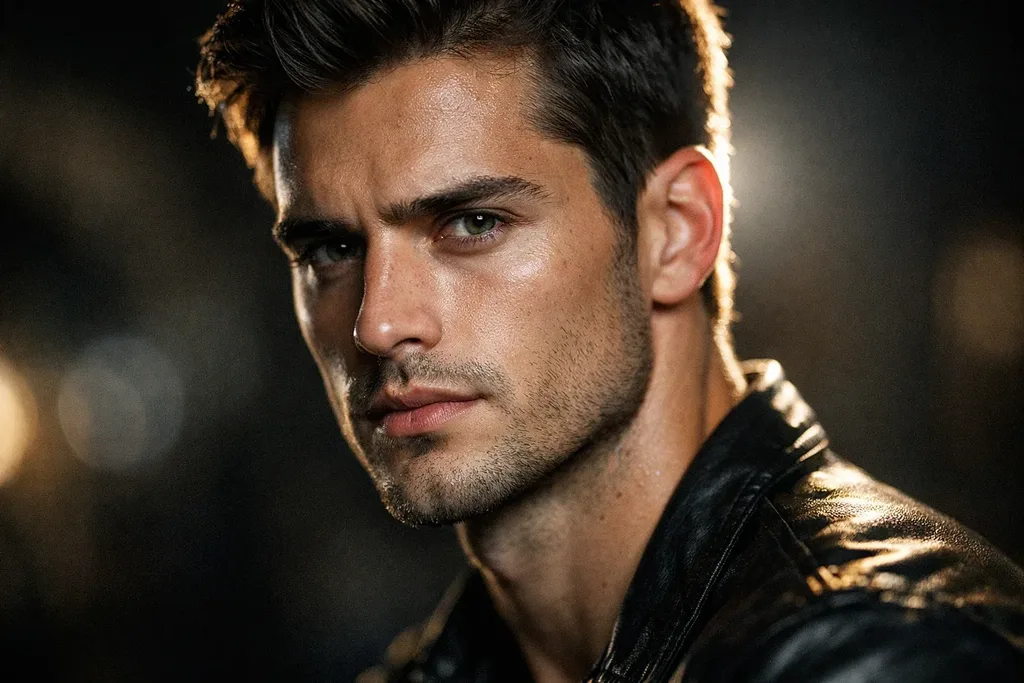
“A hyper-realistic, ultra-detailed close-up photo of [subject] shot with a high-end DSLR at 85mm f/1.4. Harsh stylized flash, dramatic shadows, sharp highlights. Every pore, fiber and skin texture visible. Shallow depth of field, creamy bokeh background. Cinematic still-life feel with a surreal edge.”
2. Studio Beauty Portrait
“Create a minimal studio beauty portrait of [subject]. Softbox key light at 45 degrees, gentle fill, smooth neutral gray background, glossy natural skin, calm confident expression, sharp catchlights in the eyes. High-end portrait photography look. Preserve face and identity exactly.”
3. Cinematic Movie-Still Portrait
“Convert this portrait into a cinematic image. Dramatic side lighting, rich teal-and-orange color grading, shallow depth of field, subtle 35mm film grain, mood-driven contrast. 85mm lens look, 4:5 ratio. Face must remain identical to the reference.”
4. Black-and-White Editorial Portrait
“Convert this portrait to a dramatic black-and-white editorial photograph. High-contrast Rembrandt lighting, deep shadows, rich tonal range, sharp facial detail, timeless fashion feel. Preserve identity and expression.”
5. Golden Hour Environmental Portrait
“A photorealistic outdoor portrait of [subject] at golden hour. Warm rim light behind the head, soft fill on the face, blurred meadow background, 50mm f/1.8, natural skin tones, candid expression, subtle lens flare.”
6. Fashion Editorial Portrait
“Create a photorealistic editorial fashion photo of this person wearing [outfit] against a textured concrete wall. Soft studio key light with gentle falloff, controlled shadows, 50mm f/2.2 look, natural pores and flyaway hairs, clean modern color grade. Vertical 2:3. Preserve the face.”
Name real camera bodies (Sony A7 IV, Fujifilm X-T5) or lenses to nudge the model toward specific bokeh and color science. It genuinely changes the output.
ChatGPT Photo Editing Prompts That Preserve Your Face
To stop ChatGPT from changing your face, add a “face-lock” instruction at the top of every edit prompt: “Preserve facial identity exactly. Do not alter, beautify, stylize or reinterpret the face.”
The single most common complaint online? “ChatGPT changed my face.” The fix takes one extra sentence.
Add this line to any edit prompt below and watch identity retention jump dramatically:
Face-lock command: “This face is locked and must remain 100% identical in every generation. Do not alter, beautify, stylize, replace or reinterpret the face. Preserve exact facial features, skin tone, expression, and proportions. No AI beautification.”
Now use these editing prompts with your uploaded photo:
7. Remove Background Cleanly
“Remove the background from this image completely and place the subject on a transparent background. Keep clean, sharp edges with no haloing. Preserve subject colors and detail. Output as a high-resolution PNG.”
8. Replace Background
“Replace the background of this image with [a minimalist white studio / tropical beach at sunset / modern office]. Keep the subject sharp and well-lit. Blend shadows and lighting naturally so the composite looks seamless.”
9. Remove Any Object
“Remove the [power lines / trash can / tourist] from this image. Reconstruct the area behind it naturally so it looks undisturbed. Preserve the original lighting, color, depth of field and texture. Avoid visible artifacts or cloning patterns.”
10. Remove a Person from a Group Photo
“Remove the person in the red shirt on the left from this photo. Rebuild the background naturally where they stood. Keep the main subject completely untouched. Match lighting and perspective so the result looks seamless.”
11. Change Outfit / Clothing
“Change the outfit on the person in this photo to a tailored navy suit. Keep the pose, body proportions, face and lighting consistent, with realistic fabric folds, texture and shadows.”
12. Change Hairstyle
“Change the hairstyle to long soft waves. Preserve the face and identity exactly. Render realistic hair texture, volume, strand detail and soft shadows so it blends naturally with the original lighting.”
13. Sharpen Faces Naturally
“Sharpen the faces in this photo naturally. Define eye detail, lash detail and hair strands. Do not alter facial structure or identity. Keep skin texture realistic and avoid an over-edited plastic look.”
14. Fix a Blurry Photo
“Improve this photo by reducing mild blur and restoring edge definition. Keep facial features, objects and textures realistic. Avoid artificial sharpness, fake detail or halo effects around edges.”
15. Fix Bad Lighting
“Relight this photo with soft even lighting. Lift the shadows gently to recover detail, tame any blown-out highlights, balance the overall exposure. Keep skin tones natural and the mood realistic. Do not flatten or over-brighten.”
For face edits, upload a cropped headshot where the ears touch the frame edges. More facial pixels = better identity retention. Simple, but nobody talks about it.
Best ChatGPT Prompts for Professional LinkedIn Headshots
A great AI headshot prompt names the background color, the lighting direction, the attire, and locks the face. Aspect ratio should be 1:1 for LinkedIn.
A polished headshot used to cost $200 and half a Saturday. Now it costs zero, if you prompt right.
16. Corporate LinkedIn Headshot
“Transform this casual photo into a professional headshot. Clean light-gray studio background, soft flattering lighting, subtle catchlights in the eyes, business attire like a navy blazer. Preserve natural skin texture and the exact facial features. Sharp focus, 1:1 ratio.”
17. Executive Boardroom Portrait
“Create an executive editorial portrait. Charcoal-gray background, Rembrandt lighting from the left, sharp gaze into camera, subtle warm color grade, dark tailored suit. 4:5 vertical, magazine-cover quality. Face identical to the reference.”
18. Creative Industry Headshot
“Transform this into a modern creative-industry headshot. Warm café or studio background at f/2.8, natural window light, relaxed half-smile, textured cotton shirt or knit sweater. Preserve identity exactly.”
19. Speaker / Keynote Headshot
“Create a keynote-speaker style headshot. Bright softbox lighting, blurred conference-hall background, confident expression, blazer over crisp white shirt, natural catchlights. 4:5 ratio, high resolution.”
20. Founder / Startup Portrait
“Photorealistic founder portrait against exposed-brick loft background, arms crossed, golden window light from the right, 35mm f/2, subtle film grain, thoughtful expression. Face 100% identical.”
21. Y2K Instagram Flash Portrait
“Give this portrait an early-2000s Instagram flash look. Direct on-camera flash, overexposed highlights, glossy skin, dark background, high contrast, subtle grain, candid pose. Preserve face and expression.”
Viral ChatGPT Image Prompts: Action Figures, Funko Pops & Trend Templates
Trending ChatGPT prompts turn your photo into an action figure, Funko Pop, LEGO minifigure, or Ghibli character. Always upload a clear reference photo and describe the packaging or style in specific detail.
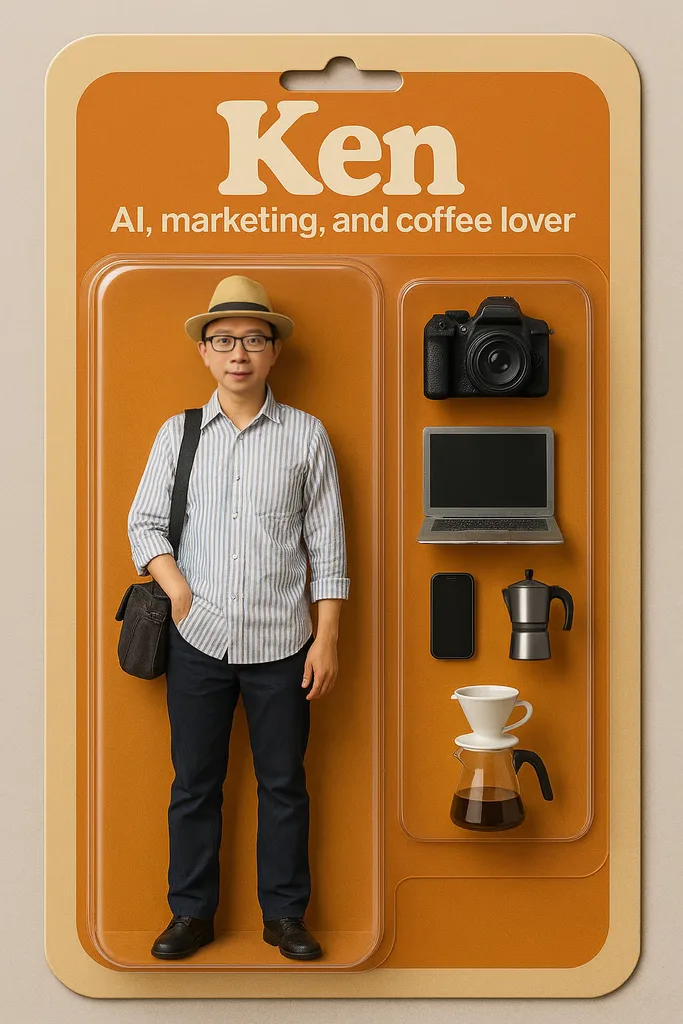
These are the prompts your LinkedIn feed keeps stealing. Copy them exactly, then swap the placeholders.
22. Action Figure in Blister Pack
“Create a picture of a 3D action figure toy based on the uploaded photo, displayed in transparent plastic blister packaging. The cardboard backing shows the name ‘[YOUR NAME]’ at the top and the job title ‘[YOUR TITLE]’ below. Include 3–4 themed accessories in the packaging (laptop, coffee cup, headphones, notebook). Studio product photography lighting, hyper-realistic, 4:5 vertical.”
23. Funko Pop Version of You
“Transform this photo into a Funko Pop figure. Oversized head, tiny body, signature large black round eyes, matte vinyl finish. Display inside a Funko-style window box with the character name printed on top. Studio lighting, clean background.”
24. LEGO Minifigure Portrait
“Turn the subject in this photo into a photorealistic LEGO minifigure. Yellow molded hands, printed torso matching the outfit, cylindrical head, glossy plastic finish. Display standing on a small LEGO base plate, studio lighting.”
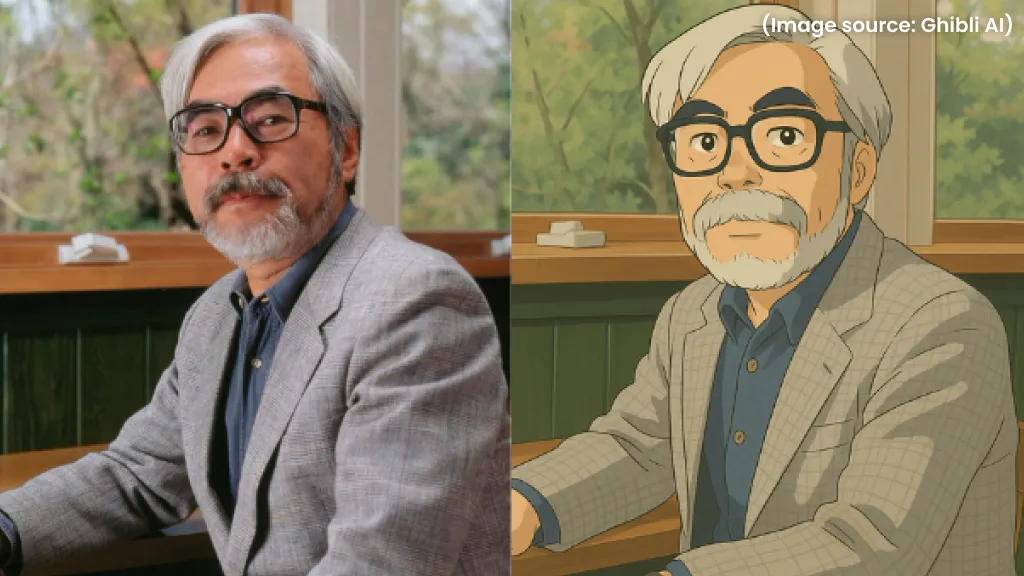
25. Studio Ghibli Portrait
“Transform this photo into the style of Studio Ghibli, emulating the techniques and aesthetics of Miyazaki. Soft pastel colors, hand-painted textures, gentle lighting, dreamy background with drifting clouds and light rays, warm nostalgic mood. Keep the subject expressive and clearly recognizable.”
26. Pixar 3D Character
“Create a 3D animated portrait of the person in this photo in a stylized cinematic animation style reminiscent of Pixar with a touch of DreamWorks charm. Big expressive eyes, soft rounded features, subsurface-scattered skin, warm cinematic lighting, vibrant colors. Keep the personality, outfit and hairstyle recognizable.”
27. Polaroid Vintage Frame
“Age this crisp photo like a 1990s Polaroid. Add heavy film grain, a slight blur around the edges, a faint warm light leak in one corner, faded colors and a classic white Polaroid frame. Keep the subject in focus with a candid nostalgic feel.”
28. Anime Illustration Portrait
“Transform this photo into a modern anime illustration. Clean cel-shading, expressive eyes, soft gradient background, dynamic lighting, subtle sparkle highlights. Keep facial identity clearly recognizable.”
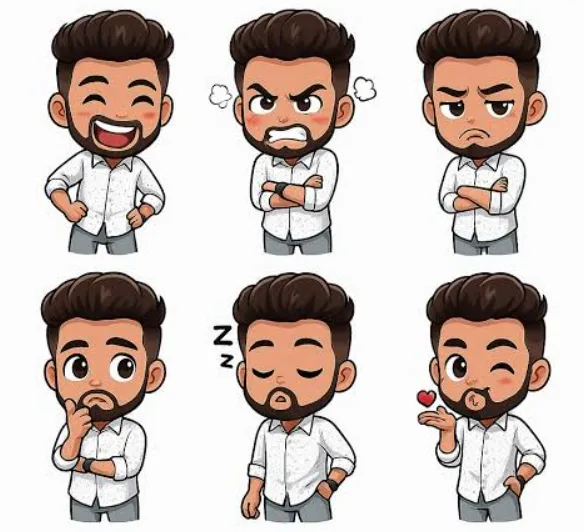
29. Chibi Sticker Pack (9 Expressions)
“Using the uploaded photo, create a 10:16 canvas featuring nine chibi-style stickers of the person in various outfits, poses and expressions: happy, sad, angry, laughing, sleeping, love, surprised, thinking, waving. Bold outlines, transparent background, kawaii aesthetic.”
30. Spirit Animal Overlay
“Use the subject from the provided image. A trail of glowing light-blue smoke should spiral upward in a single helix from the subject’s feet, coiling around the body a few times as it rises, forming the shape of a wolf above the head. Hyper-realistic cinematic lighting, natural textures and depth.”
31. Bollywood / Indian Saree Portrait
“Transform this photo into a close-up bridal portrait. The subject wears a traditional red Banarasi silk saree with rich gold zari work, temple jewelry, maang tikka, nose ring and floral hair braid. Warm golden lighting, blurred marigold-decorated background, 4:5 vertical. Preserve facial identity exactly.”
32. Character Capsule Collectible
“Create a photorealistic image of the subject inside a transparent glass capsule collectible, like a gashapon toy. Include a small themed base with the subject’s profession represented (mini laptop, tools, camera). Studio lighting, macro detail.”
ChatGPT Prompts to Restore, Colorize & Upscale Old Photos
For old-photo restoration, always add “preserve original composition, identity and period feel” and specify no beautification. That’s what stops the model from turning your grandmother into a Kardashian.
Family archives are the most emotional use case for AI photo editing. Handle them with care.
33. Restore a Damaged Old Photo
“Restore this old photograph. Repair scratches, tears and fading. Recover lost detail in the faces and balance exposure. Preserve original composition, expressions and period feel. Do not beautify or change identity. Output a clean high-resolution version.”
34. Colorize a Black-and-White Photo
“Colorize this black-and-white photograph with historically accurate natural colors. Apply realistic skin tones and period-appropriate clothing and environment colors. Preserve all shadows and tonal depth, keep colors subtle rather than oversaturated. Do not alter facial identity.”
35. Upscale a Low-Resolution Image
“Upscale this photograph to high resolution. Reconstruct blurry detail, repair compression artifacts, sharpen edges and faces. Preserve original subject, composition and identity. Do not invent new elements or add anything not present.”
36. Repair a Torn Photograph
“Reconstruct the torn or missing area of this photograph. Match grain, tone and lighting of the surrounding image exactly. Do not invent new subjects, faces or elements. Blend the seam so it is invisible.”
37. Improve Faded Vintage Colors
“Restore faded colors in this vintage photograph. Recover natural saturation, correct color casts (yellowing, magenta shift), balance overall exposure. Preserve the film grain and period character. Do not over-process.”
Best ChatGPT Prompts for Product Photography & E-commerce
For clean product photos, always specify a pure white background (#FFFFFF), soft even lighting, a natural grounding shadow, and “keep the product identical in shape, label and color.”
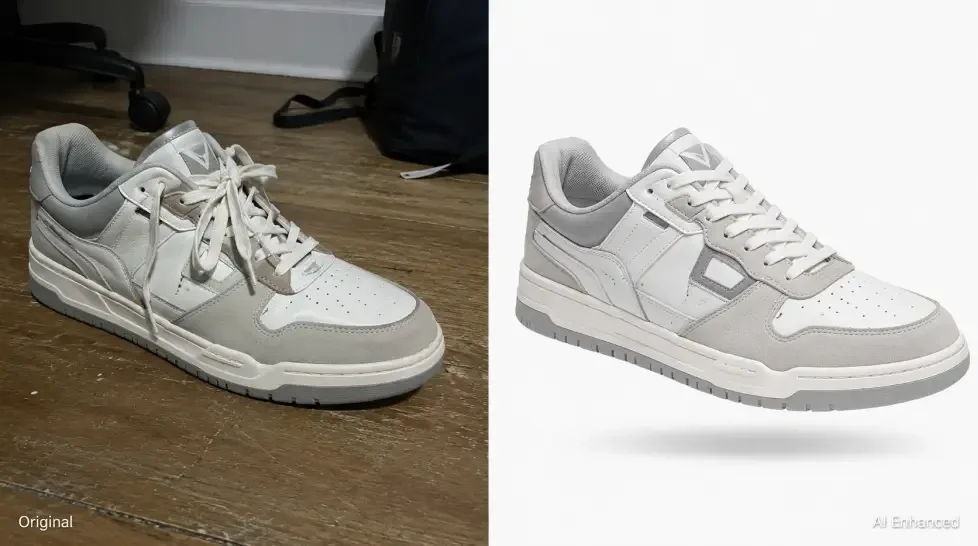
Small brands use these prompts to skip $500-a-day studio shoots. They just work.
38. Clean White-Background Product Shot
“Edit this product photo for a clean online store listing. Remove the background and replace with pure white. Even the lighting with no harsh shadows. Sharpen texture and detail. Add a soft grounding shadow beneath the product. Keep colors true to life, no artificial saturation.”
39. Lifestyle Product Scene
“Place this product in a lifestyle scene: on a marble kitchen counter beside fresh eucalyptus leaves, morning window light streaming from the left, shallow depth of field, warm color grade. Product must remain identical in shape, label and color.”
40. Amazon-Ready Product Photo
“Reformat this product photo for Amazon listing standards. Pure white background (#FFFFFF), product fills 85% of the frame, no props, sharp focus, natural colors, 2000×2000 square ratio, subtle grounding shadow.”
41. Jewelry Luxury Listing
“Retouch this jewelry photo for a luxury listing. Clean up dust and fingerprints, enhance clarity on the gemstones, control blown-out highlights while keeping realistic metal texture and reflections. Dark textured background, dramatic single-source light, sharp macro detail. Do not exaggerate shine.”
42. Cosmetic Bottle Hero Shot
“Create a hero product shot of this cosmetic bottle. Soft gradient background from cream to blush pink, subtle top-down key light, glossy specular highlight on the glass, water droplets on the label, 4:5 vertical, editorial beauty aesthetic.”
43. Fashion Flat Lay
“Create a photorealistic top-down flat lay of this outfit on a linen background. Include coordinated accessories (watch, sunglasses, coffee cup, notebook). Warm natural light from the top left, soft shadows, magazine styling.”
Cinematic & Aesthetic ChatGPT Image Prompts
Cinematic prompts work best when you name a specific film style, a color grade (teal-and-orange, muted pastel), a real focal length, and one strong mood word.
44. Cinematic Rainy Street Portrait
“A cinematic street portrait of [subject] walking through a rainy Tokyo alley at night. Neon reflections on wet pavement, cyan and magenta color grade, 35mm f/1.4, subtle motion blur, moody atmosphere. Face preserved.”
45. Teal-and-Orange Color Grade
“Apply a cinematic teal-and-orange color grade to this photo. Deepen shadows, warm the highlights, film-like contrast, subtle grain. Keep skin tones natural and preserve identity.”
46. Wes Anderson Symmetry Style
“Recompose this photo in Wes Anderson style. Perfectly centered symmetrical composition, pastel color palette (mint, peach, mustard), flat frontal lighting, vintage retro production design, 4:3 ratio.”
47. Blade Runner Cyberpunk Portrait
“Transform this into a Blade Runner style cyberpunk portrait. Neon pink and cyan rim lighting, rain streaks, holographic signage bokeh in the background, dark leather jacket, moody atmosphere. Face identical.”
48. Golden Hour Wedding Portrait
“Create a cinematic golden-hour wedding portrait from this couple’s photo, foreheads gently touching, warm backlight and soft rim lighting, quiet garden setting, creamy bokeh, 85mm f/1.4 look, honeyed romantic tones. Keep both faces exactly the same. 4:5, high resolution.”
ChatGPT Image Prompts for Food, Interiors & Real Estate
Great food, interior and real estate prompts describe the light source, the angle, and the mood — plus one grounding detail like “condensation on the glass” or “warm window light.”
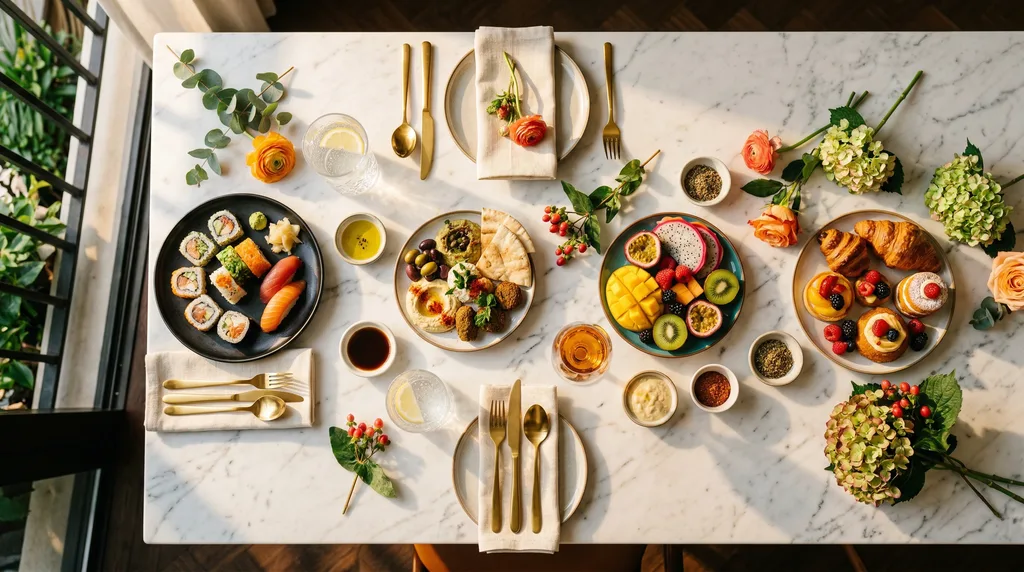
49. Editorial Overhead Food Photograph
“Create a photorealistic overhead food photo of [dish] on a rustic wooden table. Warm overhead light plus soft window fill, realistic specular highlights on sauce and glassware, condensation on the water glass, natural plating imperfections. Appetizing editorial style, 4:5 ratio.”
50. Ingredients-to-Finished-Dish
“Based on the raw ingredients visible in this photo, generate a photorealistic image of the finished cooked dish. Restaurant plating, overhead angle, natural window light, garnish appropriate to the cuisine.”
51. Real Estate Day-to-Dusk Transformation
“Transform this daytime exterior property photo into a warm twilight image. Replace the sky with a soft sunset glow, shift ambient light cooler, turn on interior and exterior lights so windows glow warmly. Keep it realistic and inviting, not overdone.”
52. AI Interior Design Restyle
“Restyle this room in Scandinavian minimalist style. Light oak floors, white walls, natural linen sofa, matte black accents, tall potted olive tree, morning window light. Preserve room layout and window positions exactly.”
53. Sky Replacement
“Replace the sky in this image with a vibrant sunset with pink and orange clouds. Blend the new sky naturally with the scene’s lighting and colors. Keep realistic shadows and highlights on all surfaces.”
Fun & Creative ChatGPT Picture Prompts
Fun prompts work when you commit fully to the concept — vague creativity gives you vague results. Describe the era, the material, the lighting, and the mood.
54. Pet-to-Human Character
“Reimagine this pet as a stylized human character reflecting the pet’s colors, patterns and personality. Illustrative, playful, soft lines, vibrant colors, inspired by the fur, eyes and expression. Creative interpretation, not an exact real person.”
55. Fantasy Alter-Ego
“Transform this photo of me into a fantasy hero character. Medieval leather armor, weathered cape, mountain backdrop at dawn, dramatic side lighting, painterly finish. Keep facial identity intact.”
56. Astronaut Version of You
“Transform the person in this photo into an astronaut floating in low orbit. Reflective helmet visor showing Earth below, hyper-detailed suit, cinematic space lighting. Keep the reflected face recognizable.”
57. Miniature Diorama Effect
“Recreate this scene as a hand-built miniature diorama shot with tilt-shift photography. Exaggerated depth of field, tiny figures, papercraft textures, warm tabletop lighting.”
58. Watercolor Portrait
“Turn this photo into a soft watercolor portrait on textured cotton paper. Loose washes, subtle color bleeds, delicate ink outlines, cream background. Keep the face expressive and clearly identifiable.”
59. Kids’ Coloring Book Page
“Create a full-page coloring book illustration featuring [subject] in [scene]. Clean bold black outlines, no shading, large enclosed areas for coloring, white background. Kid-friendly art style, portrait orientation.”
60. YouTube Thumbnail Design
“Create a photorealistic YouTube thumbnail featuring [subject] with an exaggerated shocked expression. Bold text overlay ‘YOU WON’T BELIEVE THIS’ in yellow with black outline, top-right position. High contrast, saturated colors, 16:9 landscape. Preserve the face.”
61. Sports Trading Card
“Turn this photo into a photorealistic vintage sports trading card. Textured cardboard border, subject in athletic pose, stadium background in soft focus, printed name and stats at the bottom. 90s trading card aesthetic.”
If you’re building a full content workflow — image plus copy plus caption — you can pair these prompts with our tested ChatGPT prompts for writers to create both assets in one session.
Pro Modifiers Every ChatGPT Image Prompt Needs
Adding lighting, camera, mood and quality modifiers is the fastest way to lift image quality. Layer 2–4 modifiers into any prompt for cinematic results.
Steal these modifier libraries and mix them into any prompt above:
- Lighting — golden hour, blue hour, harsh flash, softbox at 45°, Rembrandt lighting, split lighting, rim light, volumetric god rays, neon rim, window side-light
- Camera — 35mm f/1.4, 50mm f/1.8, 85mm f/1.2, macro lens, tilt-shift, wide-angle 24mm, DSLR, medium-format Hasselblad, shallow depth of field, creamy bokeh
- Mood — cinematic, moody, dreamy, nostalgic, editorial, candid, minimalist, surreal, ethereal, gritty, romantic, playful
- Quality — hyper-realistic, ultra-detailed, tack sharp, 8K, photorealistic, magazine-cover quality, RAW file look, subtle film grain
- Composition — rule of thirds, centered symmetrical, low-angle shot, top-down flat lay, over-the-shoulder, dutch angle, negative space
The excellent Learn Prompting guide to GPT-4o image generation breaks these down further if you want to go deeper. Ninety percent of my personal wins come from mixing three modifiers instead of one.
Rule of thumb: One lighting modifier + one camera modifier + one mood modifier = a solid prompt every time.
ChatGPT Image Aspect Ratios & Sizes Cheat Sheet
ChatGPT supports aspect ratios from 3:1 landscape to 1:3 portrait. Always specify one in your prompt or you’ll get a default 1:1 square.
Use the right ratio for the right platform:
| Aspect Ratio | Best Use Case | Prompt Trigger |
|---|---|---|
| 1:1 (square) | Instagram feed, LinkedIn, profile pics | “square, 1:1” |
| 4:5 (portrait) | Instagram feed portrait, editorial | “vertical 4:5” |
| 9:16 (tall) | Stories, Reels, TikTok, Shorts | “vertical 9:16, tall” |
| 16:9 (landscape) | YouTube thumbnails, blog headers | “landscape 16:9, wide” |
| 3:2 | Classic photography, blog features | “3:2, DSLR ratio” |
| 2:3 (portrait) | Book covers, magazine covers | “portrait 2:3” |
Add the ratio word directly to your prompt. Saying just “wide” or “tall” also works — the model picks up the intent.
For prompt length, ChatGPT handles very long prompts, but the first two sentences carry the most weight. If your prompt is getting bloated, run it through our free character counter to keep the core instruction under 500 characters and put nice-to-have details in a second sentence.
How to Iterate ChatGPT Image Edits Like a Pro
Never ask for five changes in one turn. Start with the biggest change (background, lighting, wardrobe), lock what worked with “keep [X] identical,” then refine one element at a time.
Images 2.5 remembers your previous edits inside the same chat. That’s the entire game.
Here’s the iteration workflow that actually works:
- Start with the strongest single change — background swap, lighting mood, or wardrobe first.
- Lock what worked — write “keep [X] identical to the previous version” in every follow-up prompt.
- Refine one element at a time — one message = one change.
- Use area selection — on desktop, drag-select the region you want changed and describe the fix.
- Reference multiple images by order — “use image 1 for the subject and image 2 for the outfit style.”
- Comment directly on the image — the new Comment feature lets you drop pins on specific areas.
If you’re teaching this workflow to a client or your team, screen-record the session using a free screen recorder so they can replay every prompt tweak.
Common ChatGPT Image Prompt Mistakes (And Quick Fixes)
Most bad AI images come from vague prompts, contradictory instructions, or cramming too many changes into one turn. Fix these five mistakes and your hit rate jumps overnight.
- Being too vague — “Make it better” gives you nothing. Name the lighting, angle and mood.
- Skipping the face-lock — always add “preserve facial identity exactly” for portrait edits.
- Contradicting yourself — “moody dark cinematic” plus “bright cheerful pastel” confuses the model. Pick one direction.
- Cramming too many changes in one turn — split edits across multiple messages.
- Forgetting aspect ratio — always specify 1:1, 4:5, 9:16 or 16:9 so the composition fits your platform.
- Using bad reference photos — upload a sharp, well-lit, high-resolution image. Garbage in, garbage out.
- Forgetting text specifications — for in-image text, put exact words in quotes and specify font style, size and placement.
- Not iterating — expecting the first output to be perfect is the biggest rookie move.
ChatGPT vs. Other AI Image Tools in 2026
ChatGPT wins for conversational photo editing and face preservation. Midjourney wins for pure artistic style. Nano Banana / Gemini wins for speed. Firefly wins for commercial safety.
| Tool | Best For | Weakness |
|---|---|---|
| ChatGPT (Images 2.5) | Conversational editing, face preservation, in-image text, iterative refinement | Free tier has strict daily limits |
| Midjourney v7 | Artistic style, painterly quality, mood boards | No native photo editing, less literal prompt following |
| Google Gemini / Nano Banana | Fast edits, cheap iterations | Weaker text rendering, less consistent identity |
| Adobe Firefly | Commercial-safe outputs, Photoshop integration | Less creative range, subscription-locked |
| Flux / Stable Diffusion | Local control, custom LoRAs | Steep learning curve, no chat interface |
For most everyday users editing existing photos, ChatGPT wins on ease and identity retention. For pure text-to-image art, Midjourney still edges ahead on aesthetic polish.
FAQ: ChatGPT Image Prompts
Is ChatGPT image generation free?
Yes. Free-tier users get a small daily allowance of images per rolling 24-hour window. Plus and Pro subscribers get much higher limits and priority speed. When you hit the free cap, ChatGPT shows the reset timing in the chat.
How do I stop ChatGPT from changing my face during edits?
Add a face-lock line at the top of every edit prompt: “Preserve facial identity exactly. Do not alter, beautify, stylize or reinterpret the face.” Upload a cropped headshot where the ears touch the frame edges for even better retention.
What is the best prompt structure for ChatGPT images?
Use the five-part formula — subject, action, setting, style and camera language, constraints — in one to three tight sentences. Then iterate one change at a time.
Can ChatGPT create images with legible in-image text?
Yes. GPT-Image-2.5 handles short text blocks reliably. Put the exact text in quotation marks, specify capitalization, and describe font style, size and placement. Keep the text short — under six words works best.
What aspect ratios does ChatGPT support?
Common ratios include 1:1 (Instagram/LinkedIn), 4:5 (portrait feed), 9:16 (Stories, Reels, TikTok), 16:9 (YouTube, landscape) and 3:2 (classic photography). ChatGPT supports ratios as wide as 3:1 and as tall as 1:3.
Why does ChatGPT sometimes refuse my image request?
Content policy blocks copyrighted characters, named real celebrities, sensitive imagery and certain brand logos. Rephrase generically — describe “a vintage sci-fi hero in leather armor” instead of naming a franchise character.
Can I keep the same character across multiple images?
Yes. Upload the same reference photo in each new chat, add a face-lock instruction, and describe consistent wardrobe and features. Inside one long chat, Images 2.5’s multi-turn memory keeps character consistency across many edits.
Can I use ChatGPT-generated images commercially?
Yes. You own the outputs and can use them commercially, but you should follow likeness and copyright laws for real people and trademarks. Review OpenAI’s usage policies before publishing anything with recognizable brands or public figures.
Final Thoughts: Prompt Like a Director, Not a Search Engine
Here’s what nobody tells you: the people getting jaw-dropping ChatGPT images aren’t using secret prompts. They’re briefing the model like they’d brief a creative agency — specific subject, specific action, specific setting, specific style, specific constraints.
Copy any prompt from this guide. Swap the placeholders. Iterate one change at a time. Within an afternoon, you’ll have a workflow that replaces stock photo subscriptions, low-budget headshot sessions, and half your Photoshop time.
Save this page. Bookmark your three favorite prompts. And remember: the best ChatGPT image prompt is the one you refine three times, not the one you nail on the first try.