
Quick answer: No — MB is bigger than KB. One megabyte (MB) equals 1,000 kilobytes (KB) in the decimal system, or 1,024 KB in the binary system computers use internally. If you only remember one thing, remember this: M is bigger than K, and each step up the ladder is about a thousand times larger.
Let me guess how you got here. You tried to email a photo and got hit with “attachment too large.” You looked at the file size and it said something like “4,200 KB.” You frowned. Is that big? Is that small? Should it be MB instead? And why does your phone say “32 GB” while your laptop says “29.8 GB” for the same storage? You are not bad at tech. The tech world is genuinely inconsistent here, and a quick side-by-side breakdown of the two systems shows exactly where the confusion starts.
This guide fixes that for good. We will cover which unit is bigger, why there are two different answers to “how many KB in a MB,” why your hard drive seems to ship with missing space, why your internet is always slower than advertised, and how to convert any of these in your head. No math degree required. Let’s go.
Which Is Bigger: KB or MB?
Short version: MB wins. A megabyte is about a thousand times bigger than a kilobyte. The prefixes tell you everything if you remember the order: kilo = thousand, mega = million, giga = billion, tera = trillion. Each one jumps up roughly a thousandfold.
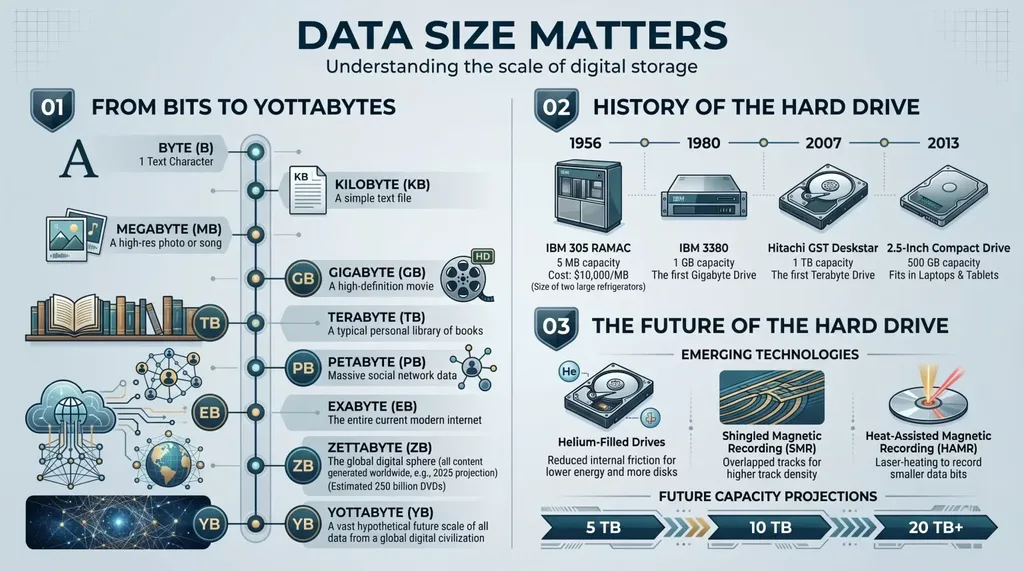
Here is the full family from smallest to largest, so you never have to guess again:
| Unit | Full name | Roughly equals | What it measures in real life |
|---|---|---|---|
| Byte | Byte | 8 bits | One letter or character |
| KB | Kilobyte | ~1,000 bytes | A short email, a tiny icon |
| MB | Megabyte | ~1,000 KB | A photo, an MP3, a document |
| GB | Gigabyte | ~1,000 MB | A movie, a phone’s storage, an app |
| TB | Terabyte | ~1,000 GB | A large hard drive, a full backup |
| PB | Petabyte | ~1,000 TB | Data centers, cloud archives |
| EB+ | Exabyte and beyond | ~1,000 PB | Global internet traffic scale |
My favorite memory trick: K comes before M in the alphabet, and the smaller unit comes first. If you can recite “K, M, G, T” in order, you know exactly which is bigger in any combination. KB < MB < GB < TB. Always.
And yes, the ladder keeps going. After petabyte comes exabyte, zettabyte, and yottabyte. You will probably never own a yottabyte drive, but it is nice to know the naming committee planned ahead.
How Many KB in a MB? The 1,000 vs 1,024 Split
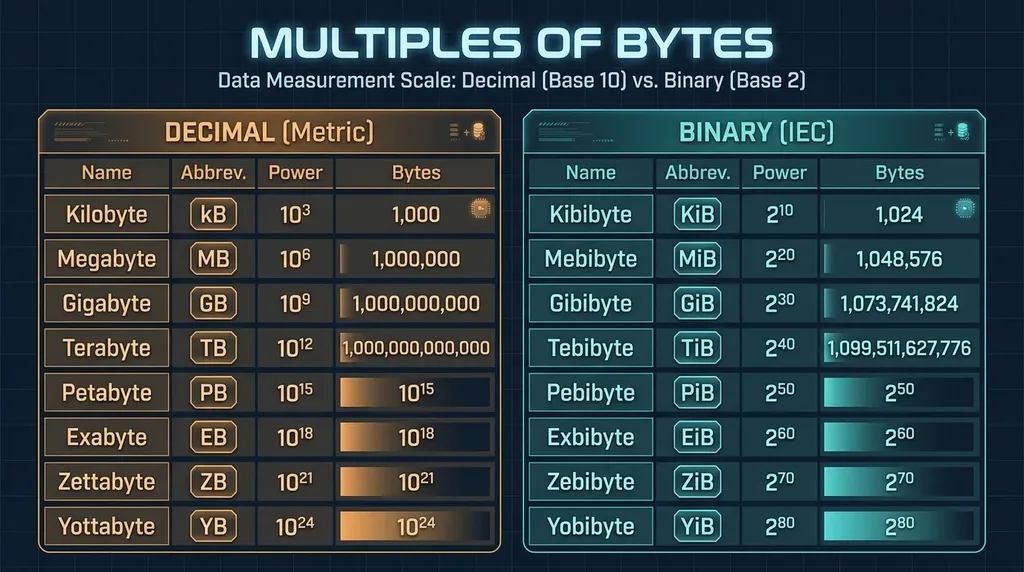
This is the question that launched a million confused Google searches, and the honest answer is: it depends who you ask. There are two official systems, both correct, used side by side every day.
- Decimal (base 10), the SI standard: 1 KB = 1,000 bytes, 1 MB = 1,000 KB = 1,000,000 bytes. This follows the normal metric system where “kilo” always means a thousand. Hard drive makers, USB stick boxes, and phone storage ads use this.
- Binary (base 2), what computers run on: 1 KB = 1,024 bytes, 1 MB = 1,024 KB = 1,048,576 bytes. Computers count in powers of two, and 2^10 = 1,024 is the closest power of two to a thousand. Windows, RAM, and most code use this.
To end the ambiguity, the standards bodies invented precise binary names — kibibyte (KiB) and mebibyte (MiB) — and the full history of binary prefixes is genuinely fascinating if you are into that sort of thing. In real life, though, almost nobody says “kibibyte.” We all say “KB” and let the context decide. That is literally the source of every KB vs MB argument you have ever had.
Which should you use? For everyday stuff — emailing a file, checking your phone storage — 1 MB ≈ 1,000 KB is close enough. For exact math, coding, or buying storage, match the system to the context: 1,000 for marketing and networks, 1,024 for Windows and memory.
Why Your 1 TB Drive Shows Only 931 GB (No, You Were Not Scammed)
This is the #1 complaint in every tech forum, and it is pure unit confusion. You buy a drive labeled “1 TB.” You plug it in. Windows says 931 GB. Where did the other 69 GB go?
Nowhere. The drive maker uses decimal: 1 TB = 1,000,000,000,000 bytes. Windows uses binary and divides that number by 1,024 three times to show gigabytes. 1,000,000,000,000 ÷ 1,024³ ≈ 931. The drive holds exactly what the box promised; your screen just reports it in a different counting system. Apple’s macOS switched to decimal reporting back in 2009, so a Mac shows the full 1 TB and sidesteps the whole issue.
The gap compounds as units grow. At KB scale it is 2.4%, at MB about 4.9%, at GB 7.4%, and at TB a full 10%. The official metric prefixes defined by NIST are the decimal ones, which is why manufacturers are legally allowed to use 1,000. So the next time someone swears their drive is broken, you can be the calm person who explains it is just math.
Bits vs Bytes: The Capital Letter That Trips Everyone Up
We have to pause KB and MB for the biggest trap of all: the lowercase b versus uppercase B. They are not interchangeable, and confusing them is why your internet always feels slower than advertised.
- Uppercase B = Byte. File sizes and storage: KB, MB, GB.
- Lowercase b = bit. Internet speed and networks: kbps, Mbps, Gbps.
One byte = 8 bits. So a megabyte is eight times larger than a megabit. Your provider sells you “100 Mbps” (megabits per second). Your files are measured in megabytes. Real download speed = Mbps ÷ 8. So 100 Mbps ≈ 12.5 MB per second. A 100 MB file takes about 8 seconds, not one. Not a scam — a unit conversion the industry quietly hopes you will not do.
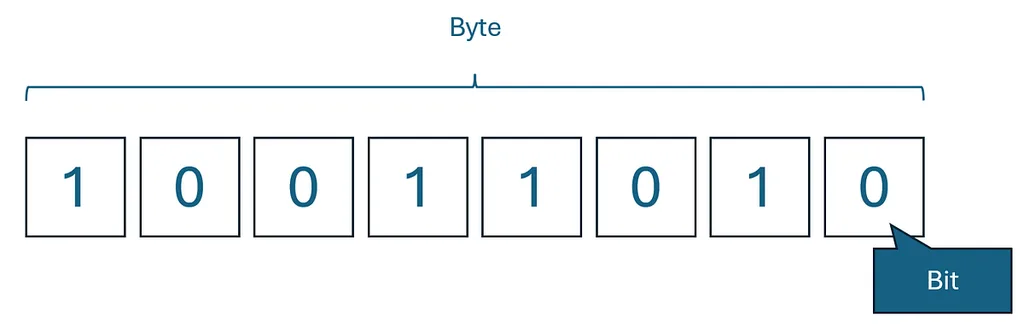
A bit is the smallest unit of digital data — a single 0 or 1. A byte groups 8 bits together, enough to store one character. The full history of the byte goes back to the 1950s, but for your purposes just remember: lowercase b means divide by 8. Uppercase B means you are already in file-size land.
What Actually Fits Inside a KB, MB, GB, or TB?
Numbers are abstract. Real files are not. This is the table I wish someone had handed me when I got my first computer.
| Unit | What it looks like in real life |
|---|---|
| 1 byte | One letter, like the “A” at the start of this sentence |
| 5 KB | A plain-text email with no attachments |
| 100 KB | A tiny thumbnail or simple icon |
| 1 MB | A long text document, or 30 seconds of low-quality audio |
| 3–5 MB | One MP3 song, or a typical smartphone JPEG photo |
| 10–25 MB | A high-res photo, a short video clip, or a large PDF |
| 1 GB | ~250 songs, or one hour of standard-definition video |
| 2–4 GB | A full HD movie, or a large mobile game |
| 15–25 GB | A 4K movie, or a modern AAA video game |
| 100 GB+ | Your entire phone backup, or a big game library |
| 1 TB | ~250,000 photos, or 500 hours of HD video |
Photos are where most people hit these limits. A modern phone photo is easily 3–5 MB, and a raw uncompressed shot can hit 20 MB or more. If an attachment keeps bouncing, this image resizer lets you shrink the file to the exact size you need without guessing. That single trick has saved me from hundreds of “file too large” errors.
How to Check Any File’s Size on Any Device
You do not need extra software. Every device shows file sizes for free — you just need to know where to tap.
- Windows: Right-click any file → Properties. The Size line shows bytes, KB, MB, or GB. Or set File Explorer to Details view and read the Size column.
- Mac: Click a file once, press Command + I (Get Info). The General section shows the size. Or use List view in Finder.
- iPhone/iPad: In the Files app, long-press a file → Info. In Photos, swipe up on a photo and the size appears.
- Android: Open Files or My Files, long-press a file, tap the menu → Details.
If you ever want the exact byte count behind a KB or MB figure, this bytes converter gives you the precise number in one click — handy when an upload form demands an exact byte limit.
How to Convert KB to MB (and Back) in Your Head
The math is simple once you know the direction. Here is your pocket cheat sheet:
| Convert | Do this | Example |
|---|---|---|
| KB → MB | Divide by 1,000 (rough) or 1,024 (exact) | 2,500 KB ÷ 1,024 ≈ 2.44 MB |
| MB → KB | Multiply by 1,000 or 1,024 | 5 MB × 1,024 = 5,120 KB |
| MB → GB | Divide by 1,000 or 1,024 | 8,000 MB ≈ 8 GB |
| GB → MB | Multiply by 1,000 or 1,024 | 2 GB × 1,024 = 2,048 MB |
| Mbps → MB/s | Divide by 8 | 50 Mbps ÷ 8 ≈ 6.25 MB/s |
If mental math is not your idea of fun, you can directly convert KB to MB that can show both decimal and binary values instantly. Bookmark it and you will never stare at a file size again.
Which System Does Your Device Actually Use?
Here is the pro move that puts you ahead of most people: know which counting system your device uses, and the numbers stop surprising you.
- Windows: Binary (1,024). File sizes and drive capacities use 1,024. This is why your 1 TB drive reads 931 GB.
- macOS (since 2009): Decimal (1,000). A 1 TB drive shows the full 1 TB, and file sizes use round thousands.
- iPhone, iPad, Android: Mostly decimal for advertised storage, though app sizes can vary.
- RAM (memory): Always binary. An 8 GB stick is truly 8 × 1,024³ bytes.
- Hard drives, SSDs, USB sticks, SD cards: Always decimal on the label — by international standard.
- Internet speed: Decimal, and in bits (Mbps), not bytes.
Once you know your device’s system, every number makes sense. A Windows user seeing “931 GB” and a Mac user seeing “1 TB” are looking at the same drive through two different lenses.
Common Myths and Mistakes (Don’t Get Tricked)
These are the traps I see people fall into every single week. Avoid them and you are ahead of 90% of computer users.
- Myth: “KB is bigger than MB because K comes first.” No. K comes first because it is the smaller unit. Mega is a thousand times bigger.
- Myth: “My 1 TB drive is defective — it only shows 931 GB.” No. Decimal vs binary. See Section 3.
- Myth: “100 Mbps should download a 100 MB file in one second.” No. Divide Mbps by 8 to get MB/s. It takes about 8 seconds.
- Myth: “All file sizes use 1,024.” No. macOS, phone storage, and drive boxes use decimal (1,000). Windows and RAM use binary (1,024).
- Myth: “KB and Kb are the same.” No. Uppercase B = bytes; lowercase b = bits. Kb is kilobits — eight times smaller than KB.
- Myth: “More KB always means better quality.” Not necessarily. A huge file can be poorly compressed, and a well-compressed MB can look identical. Size is a clue, not a verdict.
Final Thought
KB and MB are not trying to confuse you on purpose. The tech world just never fully agreed on whether a thousand means 1,000 or 1,024, and it never fully retired the lowercase b. Now you hold both answers, you know which system your device uses, and you can convert any of it in your head. The next time a file size or internet speed pops up, you will be the person in the room who instantly knows what it means. That is a small superpower — use it wisely.
Frequently Asked Questions
Is KB bigger than MB?
No. MB (megabyte) is bigger than KB (kilobyte). One megabyte equals about 1,000 kilobytes in the decimal system, or 1,024 kilobytes in the binary system used by Windows and computer memory.
How many KB are in a MB?
Two answers exist. In the decimal SI standard, 1 MB = 1,000 KB. In the binary system computers use internally, 1 MB = 1,024 KB. The precise binary terms are mebibyte (MiB) and kibibyte (KiB), but almost everyone still says MB and KB.
Which is bigger: MB or KB?
MB is bigger. A megabyte is roughly a thousand times larger than a kilobyte. Remember: kilo = thousand, mega = million.
Is a kilobyte bigger than a megabyte?
No. A kilobyte is one thousand (or 1,024) bytes. A megabyte is one million (or 1,048,576) bytes. The megabyte is about a thousand times bigger.
Why does my 1 TB hard drive show only 931 GB?
Drive manufacturers use decimal (1 TB = 1 trillion bytes) while Windows displays in binary (dividing by 1,024³). The drive holds exactly the advertised capacity; your screen just reports it in a different unit. macOS shows the full 1 TB because it switched to decimal in 2009.
What is the difference between Mbps and MB/s?
Mbps (lowercase b) is megabits per second, used for internet speed. MB/s (uppercase B) is megabytes per second, used for file sizes. One byte = 8 bits, so divide Mbps by 8 to get real download speed in MB/s.
How do I convert KB to MB?
Divide by 1,000 for a rough estimate, or by 1,024 for the exact Windows/binary value. For example, 4,096 KB ÷ 1,024 = 4 MB. To go the other way (MB to KB), multiply by 1,000 or 1,024.
What comes after GB and TB?
After gigabyte (GB) and terabyte (TB) comes petabyte (PB), exabyte (EB), zettabyte (ZB), and yottabyte (YB). Each is roughly a thousand times bigger than the last. You will mostly meet these in data-center and cloud discussions.